
Notificall
A downloadable tool for Android
Never miss a beat with NotifiCall! Say goodbye to delayed notifications for any app you've downloaded from Google Play, or web browser apps you've installed, such as X (formerly Twitter), LinkedIn, Fanvue, etc.. You can now get notifications as they happen, not when your Android communication device decides to allow them through! Notificall is perfect for creators and fans alike, or anyone who thrives on real-time feedback. So whether you’re chasing likes, messages, or being one of the first on the scene in the hottest new thread, or rushing in to collect that game drop, Notificall has you covered!
Why use Notificall?
• Creators: Stay connected with fans without delays!
• Fans: be amongst the first to reply to your favorite creator's posts or DMs!
• People who rely on instant relational feedback!
• Pixel and Samsung device users, plus other newer Android devices!
• To get notifications when an in-game task has completed or a treasure drop becomes available in your favorite video games!
• To receive instant notifications for apps installed from the google play store!
• To receive Instant notifications for browser installed Web Apps!
App Description:
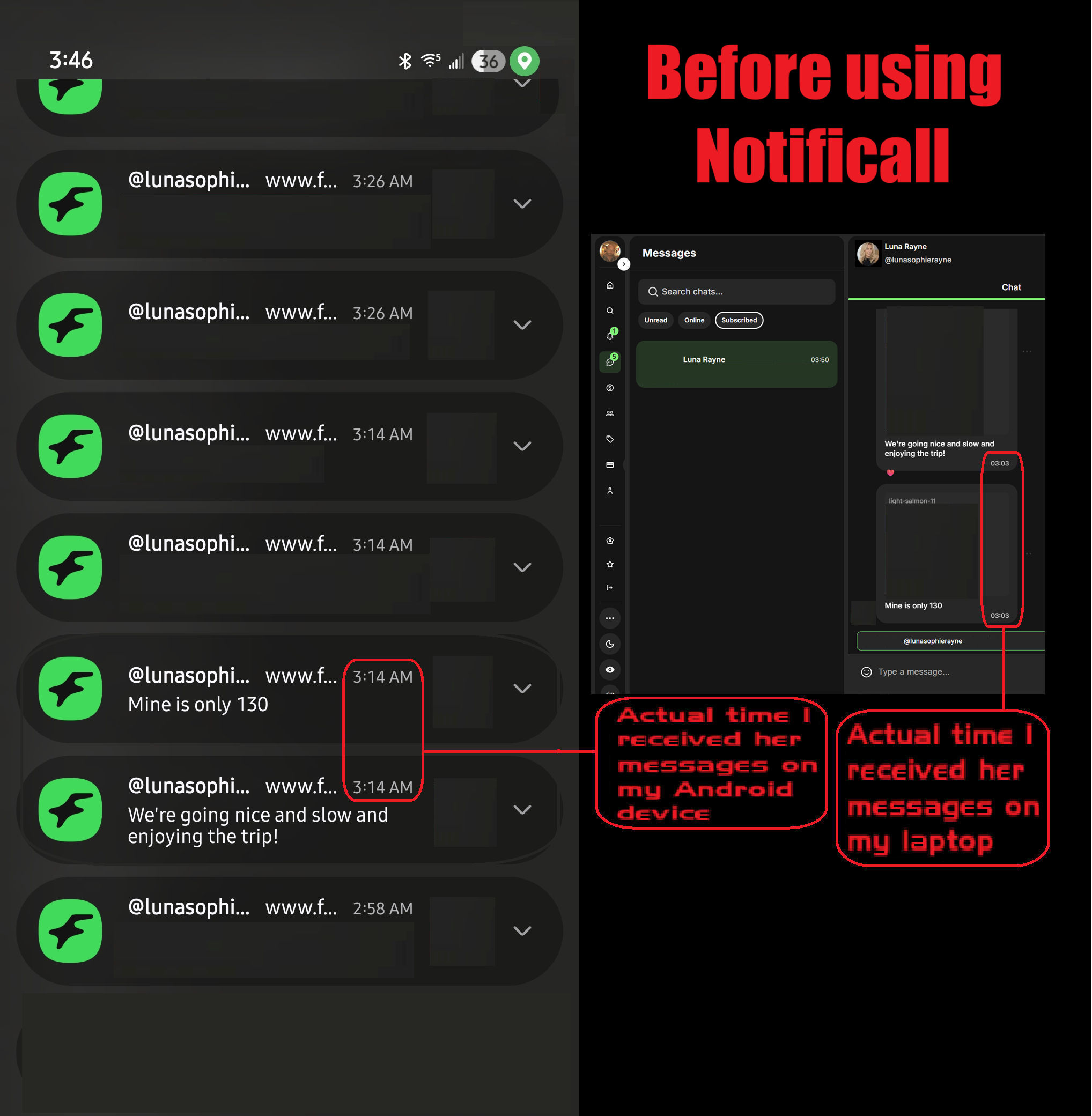
Notificall restores your device's core purpose: timely communication, to let people communicate in as timely a manner as possible. But lately it seems In the last few years battery charge up time has taken over the spotlight, the reason? For a company to boast their product has the longest battery up time to sell more devices!! The price you the consumer pays? When your phone's asleep and it's screen is off, your notifications get delayed! That is not acceptable! there is a scenario going on as of late you probably know all too well: You get a notification from one of your apps, you rush over and unlock your device because you know who it is, or that it's the drop you've been waiting for in your game that has just happened! you turn on the screen and see it is true! that notification came through!! But at last it was not to be! you open the notification and find out the drop you'd been waiting for in your game had come and gone 7 to 14 minutes ago, or the creator you follow had said they were giving something special to their followers responding in the next 90 seconds, and even though your screen was only off for a few minutes, the notification delay was a full 7 minutes late.. or more! That means opportunities lost forever. Well not any more! With Notificall at the helm, there will be no more of having to keep your device plugged in and charging with the 'Keep Screen On While Charging' setting enabled in the Developer Options so you can receive notifications in a timely manner, which quickly drains your battery and shortens it's life as well!
Why is this happening?
Android’s battery-saving features are slowing down your connections with a routine called 'Maintenance Windows'. When your screen shuts off and a few minutes go by, typically 15 to 30, and much less on some Samsung devices, your device goes into 'Doze Mode' in which only system apps with high priorities, such as your Phone app and factory installed text messaging app, are allowed to open a maintenance window and send you a notification, For all other apps there opens a Maintenance Window every 7 to 14 minutes, or even longer the deeper into doze mode the device gets as time goes by without turning the screen back on. If your device detects you yourself are sleeping, you won't get notifications for a half hour or even more!
App features:
• 2 ways to select your apps! Select any social media apps installed on your device from a list, or select any of your apps installed on your device from a list.
• Respects your selected app's individual notification settings.
• Dialog boxes guide you seamlessly through setting up your apps to receive your notifications fast.
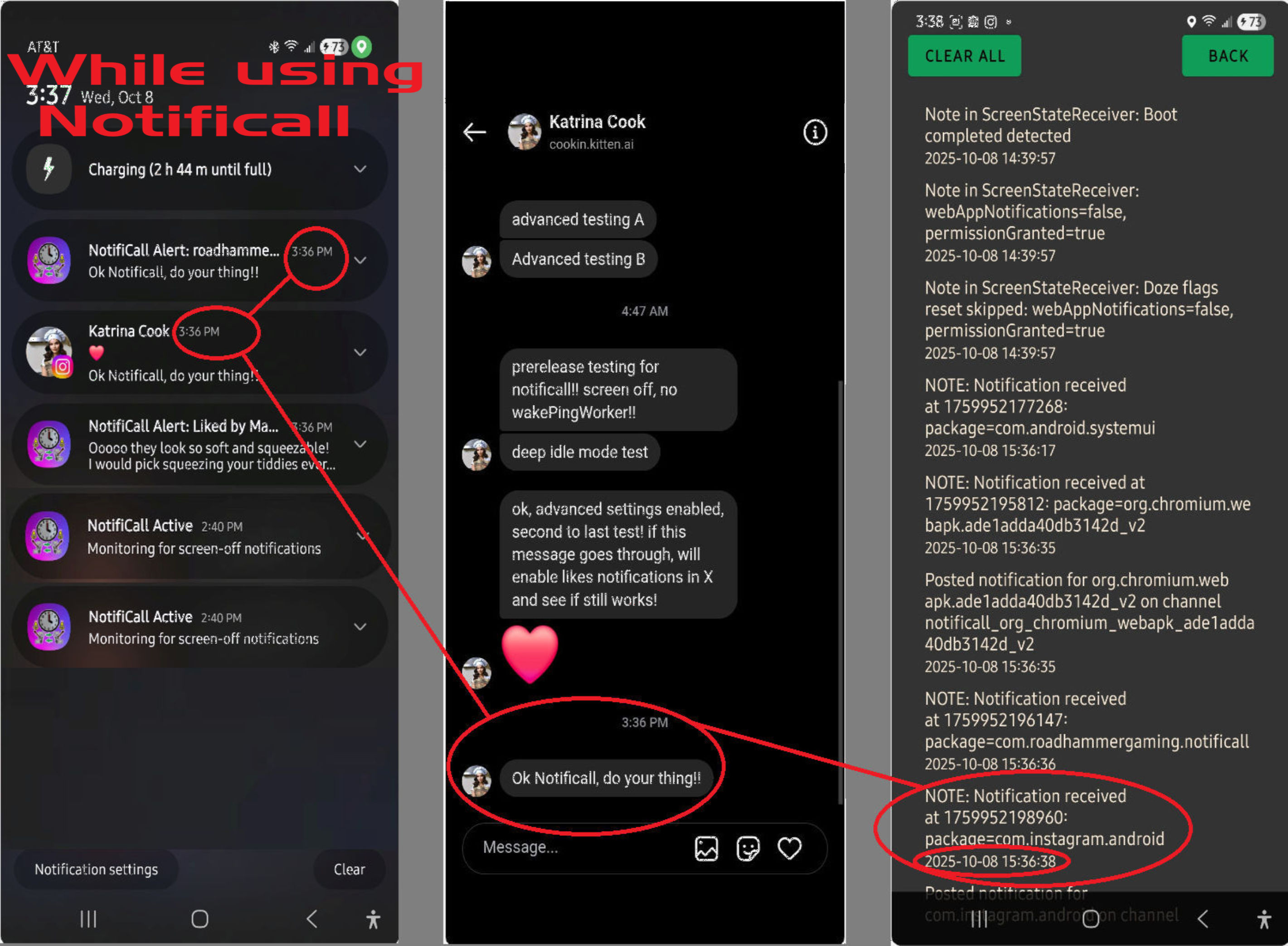
Note that just setting the recommended settings for your apps is not enough, Notificall uses proprietary code along with these settings to monitor and retrieve your notifications when they arrive from the server when your device is sleeping!
• easy to understand no-nonsense User Interface.
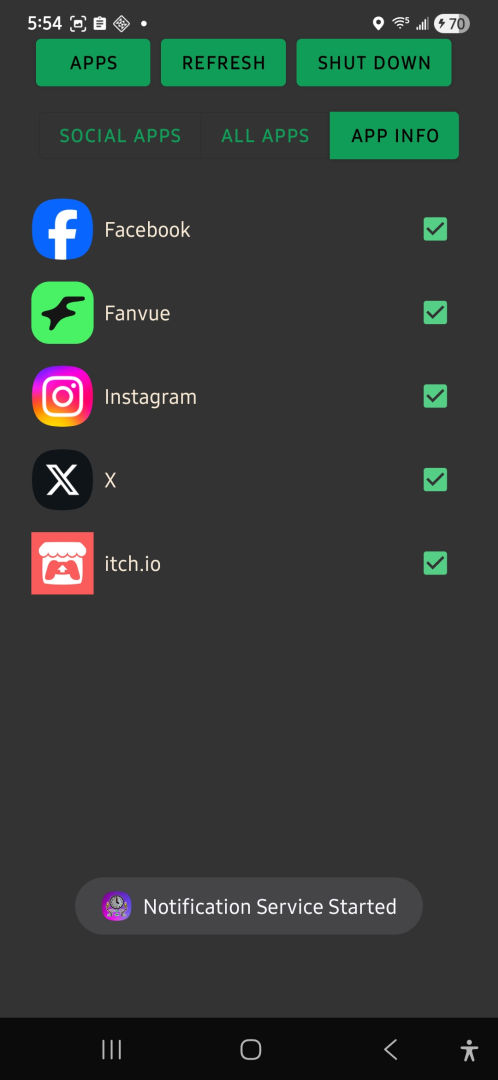
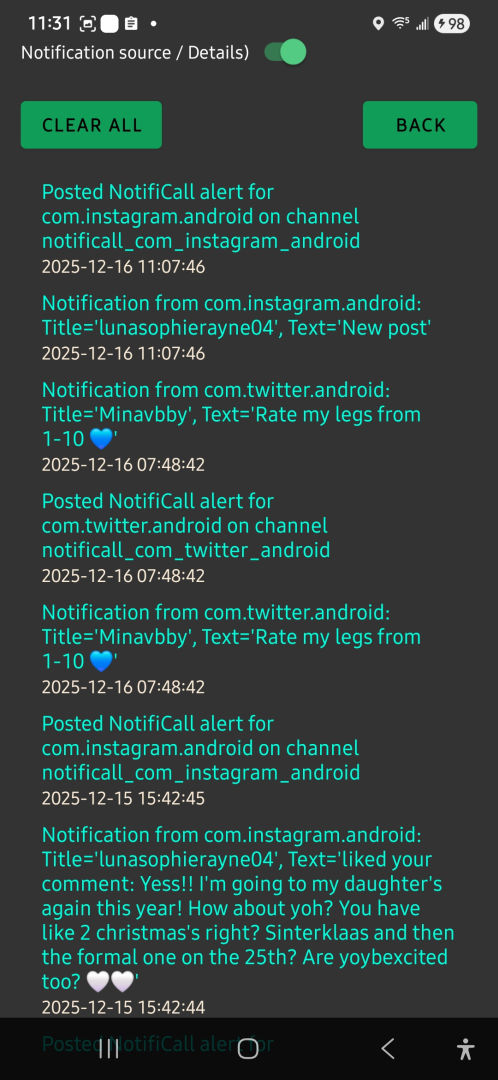
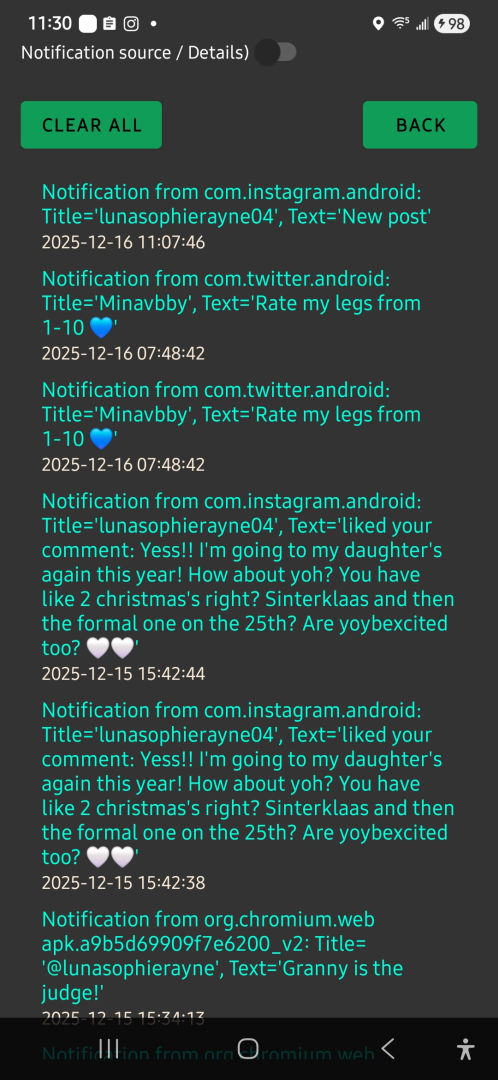
• All of your message notifications are saved in descending order on the APP INFO page so you can find any received notifications at any time.
• Notificall can be shutdown for times you don't want to receive instant notifications.
• Minimal battery drain when in use, in my testing on a Samsung a54g, I got 18 - 20 hours on a full charge. In fact, Notificall uses a negligeable amount of battery charge, if you go into your device's battery usage in settings and click details, you won't even see it on the list because it uses less than 0.1%.
• Set it and forget it: Easy set up, and you don't need to reopen the app unless you want to change a setting, add/remove an app, or read your past notifications.
• No need to root your device to use any of Notificall's features.
• Refresh button: If you stop getting timely notifications for the aps you've selected the most likely cause is if you or the operating system revoked a needed permission, This can sometimes happen during an operating system update. The 'Refresh' button checks the permissions and if needed will ask to re- enable them.
Directions:
Download the Notificall app
1. Tap the APK in your Downloads folder.
2. If prompted, allow your browser (e.g., Chrome) or file manager to install unknown apps (Settings > Apps > [App] > Install unknown apps).
3. Install and open NotifiCall.
4. Accept all of the permissions or the app will not work. you will also be prompted to remove the restrictions on Notificall's battery usage, if you don't press 'allow', the app will not work.
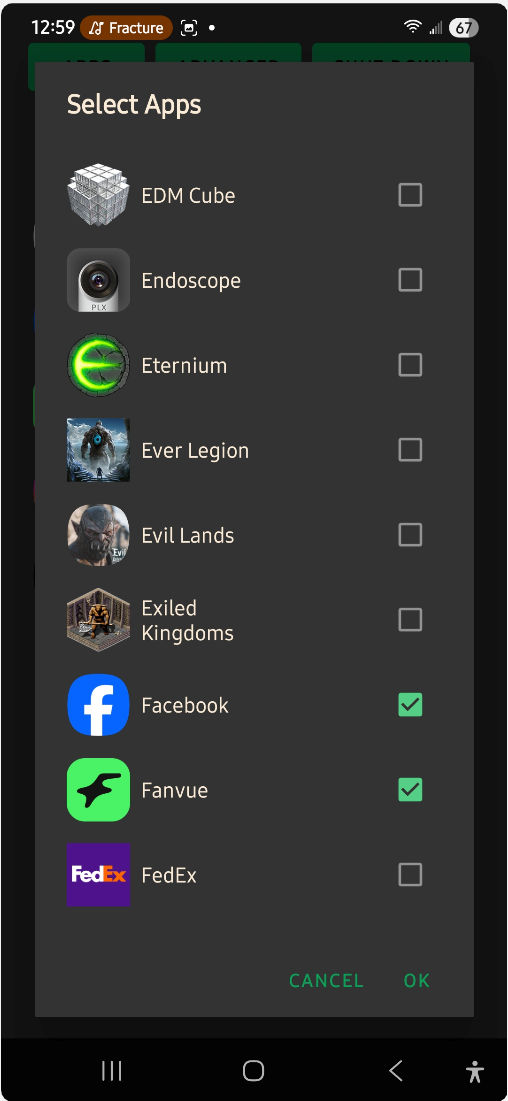
5. Once you've installed the app and accepted the permissions, choose and set up your desired apps: press the 'SOCIAL APPS' button to select a list of only social media apps, or click the 'ALL APPS' button for the full list of all the apps and web browser installed apps on your device, then click the 'APPS' button to view the apps list. Check the box next to the apps you want to receive instant notifications from. A dialog box will appear if that app's battery usage is restricted, and will take you to that apps settings, then click 'battery', then click the unrestricted option.
When You're done with the settings, exit the app with your device's back button and enjoy getting all your important notifications in a timely manner!
Return to the app to re read your notifications in the APP INFO page at any time, or you can delete all your saved notifications by clicking the CLEAR ALL button. Plus you can toggle the notification details on or off at your preference as well.
Use the SHUT DOWN button to stop Notificall from receiving and serving instant notifications and close the app. To re-enable Notificall, simply open the app again.
Purchase
In order to download this tool you must purchase it at or above the minimum price of $1.99 USD. You will get access to the following files:
Development log
- Notificall updatedDec 08, 2025
- Notifical Big updateDec 06, 2025
- Notifical updated, fine tuned notification logsDec 05, 2025
- Notifical updated, v2.5Oct 18, 2025
- Notifical updatedOct 13, 2025
- Notificall Devlog updateOct 09, 2025
- Notificall is now released!Oct 09, 2025
Leave a comment
Log in with itch.io to leave a comment.